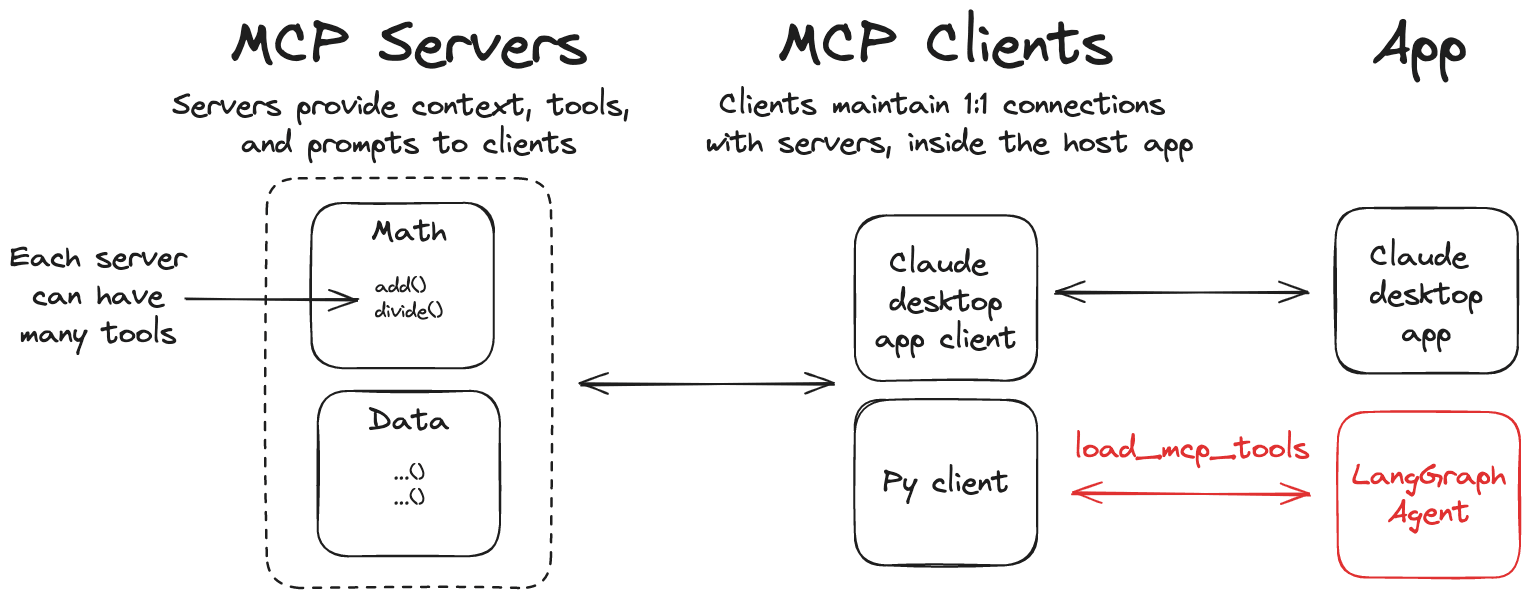
LangChain MCP Adapter is a lightweight adapter for MCP tools to be compatible with LangChain and LangGraph. Features 🛠️ Convert MCP tools to LangChain tools, which can be used with LangGraph agents 📦 A client implementation that allows you to connect to multiple MCP servers and load tools from them Installation pip install langchain-mcp-adapters If you are using the uv package manager, you can use the following command to install: uv add langchain-mcp-adapters langgraph langchain-openai Quick Start Let's create a simple example using this library. First, we need to set your OpenAI API key: export OPENAI_API_KEY=<your_api_key> # If you need to use a proxy, you can set this variable export OPENAI_API_BASE=<your_api_base> Server Let's create a MCP server that can add and multiply numbers, the code is as follows: # math_server.py from fastmcp import FastMCP mcp = FastMCP("Math Server") @mcp.tool() def add(a: int, b: int) -> int: """Add two integers""" return a + b @mcp.tool() def mul(a: int, b: int) -> int: """Multiply two integers""" return a * b if __name__ == "__main__": mcp.run(transport="stdio") 客户端 Next, let's create a client that uses MCP tools with a LangGraph agent. # client_demo.py from mcp import ClientSession, StdioServerParameters from mcp.client.stdio import stdio_client import asyncio from langchain_mcp_adapters.tools import load_mcp_tools from langgraph.prebuilt import create_react_agent from langchain_openai import ChatOpenAI model = ChatOpenAI(model="gpt-4o") server_params = StdioServerParameters( command="python", # Ensure the full absolute path to math_server.py is updated args=["/your/path/to/math_server.py"], ) async def main(): async with stdio_client(server_params) as (read, write): async with ClientSession(read, write) as session: # Initialize connection await session.initialize() # Get tools tools = await load_mcp_tools(session) print(f"tools: {tools}") # Create and run agent agent = create_react_agent(model, tools) agent_response = await agent.ainvoke({"messages": "what's (3 + 5) x 12?"}) # Output all messages print("All messages:") for message in agent_response["messages"]: print(f"Message type: {type(message).__name__}") print(f"Message content: {message.content}") if hasattr(message, 'tool_calls') and message.tool_calls: print(f"Tool calls: {message.tool_calls}") if hasattr(message, 'name') and message.name: print(f"Tool name: {message.name}") if hasattr(message, 'tool_call_id') and message.tool_call_id: print(f"Tool call id: {message.tool_call_id}") print("-" * 50) if __name__ == "__main__": asyncio.run(main()) In the above code, we use the load_mcp_tools function in the langchain_mcp_adapters.tools module to load MCP tools, which automatically converts MCP tools to LangChain tools. So we can directly use create_react_agent to create an agent and pass these tools to it. We can directly run this MCP client, and you will see an output similar to the following: $ python3 client_demo.py [04/14/25 10:18:04] INFO Processing request of type ListToolsRequest server.py:534 tools: [StructuredTool(name='add', description='Add two integers', args_schema={'properties': {'a': {'title': 'A', 'type': 'integer'}, 'b': {'title': 'B', 'type': 'integer'}}, 'required': ['a', 'b'], 'title': 'addArguments', 'type': 'object'}, response_format='content_and_artifact', coroutine=<function convert_mcp_tool_to_langchain_tool.<locals>.call_tool at 0x11244aac0>), StructuredTool(name='mul', description='Multiply two integers', args_schema={'properties': {'a': {'title': 'A', 'type': 'integer'}, 'b': {'title': 'B', 'type': 'integer'}}, 'required': ['a', 'b'], 'title': 'mulArguments', 'type': 'object'}, response_format='content_and_artifact', coroutine=<function convert_mcp_tool_to_langchain_tool.<locals>.call_tool at 0x11244aca0>)] [04/14/25 10:18:09] INFO Processing request of type CallToolRequest server.py:534 INFO Processing request of type CallToolRequest server.py:534 All messages: Message type: HumanMessage Message content: what's (3 + 5) x 12? -------------------------------------------------- Message type: AIMessage Message content: Tool calls: [{'name': 'add', 'args': {'a': 3, 'b': 5}, 'id': 'call_0_c350e878-14fc-4b76-9f54-8e2ad7ec0148', 'type': 'tool_call'}, {'name': 'mul', 'args': {'a': 8, 'b': 12}, 'id': 'call_1_c0d807fb-31c8-43ed-9f7c-d4775e30a256', 'type': 'tool_call'}] -------------------------------------------------- Message type: ToolMessage Message content: 8 Tool name: add Tool call id: call_0_c350e878-14fc-4b76-9f54-8e2ad7ec0148 -------------------------------------------------- Message type: ToolMessage Message content: 96 Tool name: mul Tool call id: call_1_c0d807fb-31c8-43ed-9f7c-d4775e30a256 -------------------------------------------------- Message type: AIMessage Message content: The result of \((3 + 5) \times 12\) is \(96\). -------------------------------------------------- As you can see from the last output, our agent successfully called the MCP tools and got the correct result. Multiple MCP Servers Similarly, this MCP adapter allows you to connect to multiple MCP servers and load tools from them. Server We have already created a MCP server, now let's create a weather_server.py MCP server, the code is as follows: # weather_server.py from mcp.server.fastmcp import FastMCP mcp = FastMCP("Weather") @mcp.tool() async def get_weather(location: str) -> str: """Get weather for location.""" # mock a weather data return f"It's always sunny in {location}" if __name__ == "__main__": mcp.run(transport="sse") Here we use the sse transport protocol, now let's run this MCP server: $python weather_server.py INFO: Started server process [64550] INFO: Waiting for application startup. INFO: Application startup complete. INFO: Uvicorn running on http://0.0.0.0:8000 (Press CTRL+C to quit) Client Now, let's create a client_demo_multi_server.py client, the code is as follows: # client_demo_multi_server.py from langchain_mcp_adapters.client import MultiServerMCPClient from langgraph.prebuilt import create_react_agent from langchain_openai import ChatOpenAI import asyncio model = ChatOpenAI(model="deepseek-chat") async def main(): async with MultiServerMCPClient( { "math": { "command": "python", # Ensure the full absolute path to math_server.py is updated "args": ["/your/path/to/math_server.py"], "transport": "stdio", }, "weather": { # Ensure you start from weather_server.py "url": "http://localhost:8000/sse", "transport": "sse", } } ) as client: agent = create_react_agent(model, client.get_tools()) math_response = await agent.ainvoke({"messages": "what's (3 + 5) x 12?"}) weather_response = await agent.ainvoke({"messages": "what is the weather in chengdu?"}) for message in math_response["messages"]: print(f"Math Message type: {type(message).__name__}") print(f"Math Message content: {message.content}") if hasattr(message, 'tool_calls') and message.tool_calls: print(f"Math Tool calls: {message.tool_calls}") if hasattr(message, 'name') and message.name: print(f"Math Tool name: {message.name}") if hasattr(message, 'tool_call_id') and message.tool_call_id: print(f"Math Tool call id: {message.tool_call_id}") print("-" * 50) print("*" * 50) for message in weather_response["messages"]: print(f"Weather Message type: {type(message).__name__}") print(f"Weather Message content: {message.content}") if hasattr(message, 'tool_calls') and message.tool_calls: print(f"Weather Tool calls: {message.tool_calls}") if hasattr(message, 'name') and message.name: print(f"Weather Tool name: {message.name}") if hasattr(message, 'tool_call_id') and message.tool_call_id: print(f"Weather Tool call id: {message.tool_call_id}") print("-" * 50) if __name__ == "__main__": asyncio.run(main()) In the above code, we pass two different MCP servers to the MultiServerMCPClient class of the MCP adapter, it allows you to connect to multiple MCP servers and load tools from them, now let's run this client, you will see an output similar to the following: $python3 client_demo_multi_server.py [04/14/25 10:32:45] INFO Processing request of type ListToolsRequest server.py:534 [04/14/25 10:32:52] INFO Processing request of type CallToolRequest server.py:534 INFO Processing request of type CallToolRequest server.py:534 Math Message type: HumanMessage Math Message content: what's (3 + 5) x 12? -------------------------------------------------- Math Message type: AIMessage Math Message content: Math Tool calls: [{'name': 'add', 'args': {'a': 3, 'b': 5}, 'id': 'call_0_e6994441-0520-4840-a711-552f78f82e57', 'type': 'tool_call'}, {'name': 'mul', 'args': {'a': 12, 'b': 8}, 'id': 'call_1_d7e9a0d9-ba99-4f07-b583-6f554ee6fecc', 'type': 'tool_call'}] -------------------------------------------------- Math Message type: ToolMessage Math Message content: 8 Math Tool name: add Math Tool call id: call_0_e6994441-0520-4840-a711-552f78f82e57 -------------------------------------------------- Math Message type: ToolMessage Math Message content: 96 Math Tool name: mul Math Tool call id: call_1_d7e9a0d9-ba99-4f07-b583-6f554ee6fecc -------------------------------------------------- Math Message type: AIMessage Math Message content: The result of \((3 + 5) \times 12\) is \(96\). -------------------------------------------------- ************************************************** Weather Message type: HumanMessage Weather Message content: what is the weather in chengdu? -------------------------------------------------- Weather Message type: AIMessage Weather Message content: Weather Tool calls: [{'name': 'get_weather', 'args': {'location': 'chengdu'}, 'id': 'call_0_dbabcd6c-39a6-4d39-8509-8763e7792f77', 'type': 'tool_call'}] -------------------------------------------------- Weather Message type: ToolMessage Weather Message content: It's always sunny in chengdu Weather Tool name: get_weather Weather Tool call id: call_0_dbabcd6c-39a6-4d39-8509-8763e7792f77 -------------------------------------------------- Weather Message type: AIMessage Weather Message content: The weather in Chengdu is As you can see from the above output, our agent successfully called two different MCP servers and got the correct result. Using in LangGraph API Server [!TIP] Check out this guide to start using LangGraph API server. If you want to run a LangGraph agent that uses MCP tools in a LangGraph API server, you can use the following settings: # graph.py from contextlib import asynccontextmanager from langchain_mcp_adapters.client import MultiServerMCPClient from langgraph.prebuilt import create_react_agent from langchain_anthropic import ChatAnthropic model = ChatAnthropic(model="claude-3-5-sonnet-latest") @asynccontextmanager async def make_graph(): async with MultiServerMCPClient( { "math": { "command": "python", # Ensure the full absolute path to math_server.py is updated "args": ["/path/to/math_server.py"], "transport": "stdio", }, "weather": { # Ensure you start from weather_server.py "url": "http://localhost:8000/sse", "transport": "sse", } } ) as client: agent = create_react_agent(model, client.get_tools()) yield agent Remember to ensure that make_graph is specified as your graph entry point in your langgraph.json: { "dependencies": ["."], "graphs": { "agent": "./graph.py:make_graph" } } Summary LangChain MCP Adapter is a lightweight adapter for MCP tools to be compatible with LangChain and LangGraph. It allows you to connect to multiple MCP servers and load tools from them, and use these tools with LangGraph agents to achieve more complex tasks. This also greatly reduces the threshold for using MCP tools in LangChain and LangGraph, making it easier to use MCP tools. References LangChain MCP Adapter LangGraph API Server