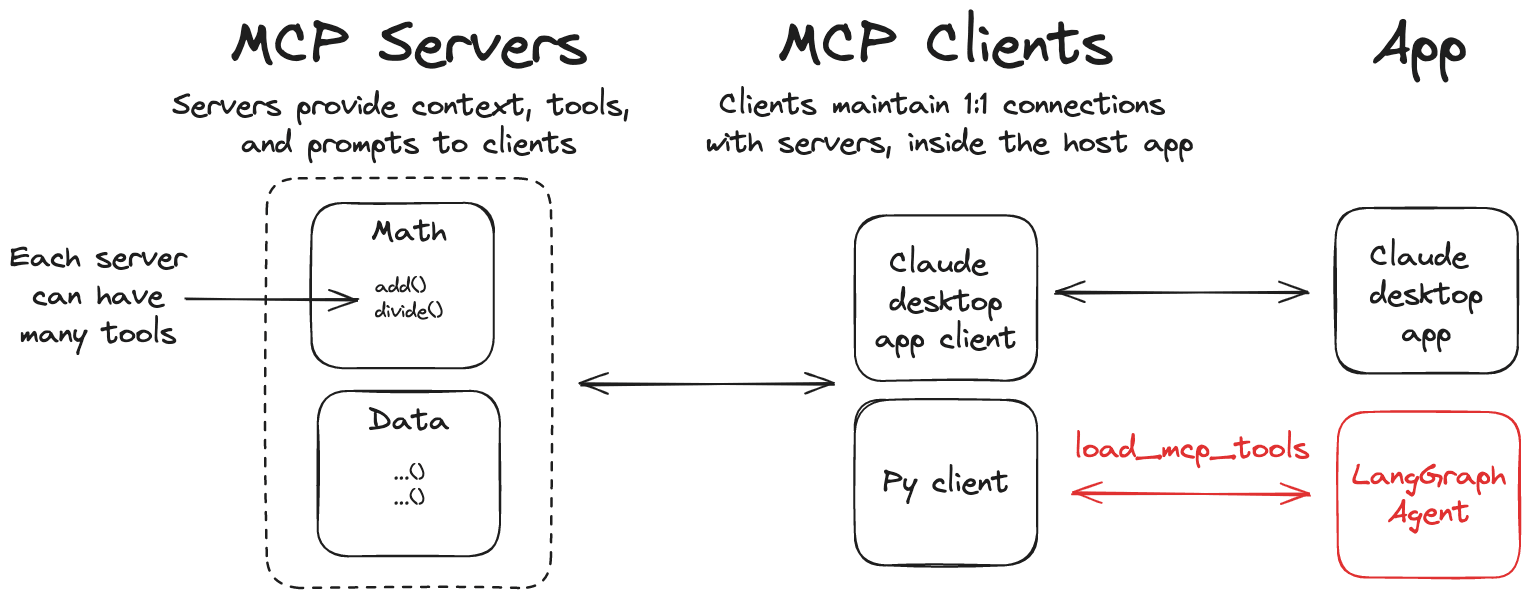
LangChain MCP 어댑터 라이브러리는 Anthropic Model Context Protocol (MCP) 도구를 LangChain과 LangGraph와 호환되게 해주는 경량 어댑터를 제공합니다. 특징 🛠️ MCP 도구를 LangChain 도구로 변환하여 LangGraph 에이전트와 함께 사용 가능 📦 여러 MCP 서버에 연결하고 해당 서버에서 도구를 로드할 수 있는 클라이언트 구현 설치 pip install langchain-mcp-adapters uv 패키지 관리자를 사용하는 경우 다음 명령을 사용하여 설치할 수 있습니다. uv add langchain-mcp-adapters langgraph langchain-openai 빠른 시작 이 라이브러리를 사용하여 간단한 예제를 만들어 보겠습니다. 먼저 OpenAI API 키를 설정해야 합니다. export OPENAI_API_KEY=<your_api_key> # 프록시를 사용해야 하는 경우 이 변수를 설정하세요. export OPENAI_API_BASE=<your_api_base> 서버 예를 들어 더하기와 곱하기 숫자를 할 수 있는 MCP 서버를 만들어 보겠습니다. # math_server.py from fastmcp import FastMCP mcp = FastMCP("Math Server") @mcp.tool() def add(a: int, b: int) -> int: """Add two integers""" return a + b @mcp.tool() def mul(a: int, b: int) -> int: """Multiply two integers""" return a * b if __name__ == "__main__": mcp.run(transport="stdio") 클라이언트 다음으로, MCP 도구를 사용하여 LangGraph 에이전트와 함께 작업하는 클라이언트를 만들어 보겠습니다. # client_demo.py from mcp import ClientSession, StdioServerParameters from mcp.client.stdio import stdio_client import asyncio from langchain_mcp_adapters.tools import load_mcp_tools from langgraph.prebuilt import create_react_agent from langchain_openai import ChatOpenAI model = ChatOpenAI(model="gpt-4o") server_params = StdioServerParameters( command="python", # math_server.py 의 전체 절대 경로를 확인하세요. args=["/your/path/to/math_server.py"], ) async def main(): async with stdio_client(server_params) as (read, write): async with ClientSession(read, write) as session: # 초기화 연결 await session.initialize() # 도구 가져오기 tools = await load_mcp_tools(session) print(f"tools: {tools}") # 에이전트 생성 및 실행 agent = create_react_agent(model, tools) agent_response = await agent.ainvoke({"messages": "what's (3 + 5) x 12?"}) # 모든 메시지 출력 print("All messages:") for message in agent_response["messages"]: print(f"Message type: {type(message).__name__}") print(f"Message content: {message.content}") if hasattr(message, 'tool_calls') and message.tool_calls: print(f"Tool calls: {message.tool_calls}") if hasattr(message, 'name') and message.name: print(f"Tool name: {message.name}") if hasattr(message, 'tool_call_id') and message.tool_call_id: print(f"Tool call id: {message.tool_call_id}") print("-" * 50) if __name__ == "__main__": asyncio.run(main()) 위 코드에서는 langchain_mcp_adapters.tools 모듈의 load_mcp_tools 함수를 사용하여 MCP 도구를 로드하고, 이 함수는 MCP 도구를 LangChain 도구로 자동 변환합니다. 따라서 이후 create_react_agent 를 사용하여 에이전트를 생성하고 이러한 도구를 전달하여 사용할 수 있습니다. 이 클라이언트를 직접 실행하면 다음과 같은 출력을 볼 수 있습니다. $ python3 client_demo.py [04/14/25 10:18:04] INFO Processing request of type ListToolsRequest server.py:534 tools: [StructuredTool(name='add', description='Add two integers', args_schema={'properties': {'a': {'title': 'A', 'type': 'integer'}, 'b': {'title': 'B', 'type': 'integer'}}, 'required': ['a', 'b'], 'title': 'addArguments', 'type': 'object'}, response_format='content_and_artifact', coroutine=<function convert_mcp_tool_to_langchain_tool.<locals>.call_tool at 0x11244aac0>), StructuredTool(name='mul', description='Multiply two integers', args_schema={'properties': {'a': {'title': 'A', 'type': 'integer'}, 'b': {'title': 'B', 'type': 'integer'}}, 'required': ['a', 'b'], 'title': 'mulArguments', 'type': 'object'}, response_format='content_and_artifact', coroutine=<function convert_mcp_tool_to_langchain_tool.<locals>.call_tool at 0x11244aca0>)] [04/14/25 10:18:09] INFO Processing request of type CallToolRequest server.py:534 INFO Processing request of type CallToolRequest server.py:534 All messages: Message type: HumanMessage Message content: what's (3 + 5) x 12? -------------------------------------------------- Message type: AIMessage Message content: Tool calls: [{'name': 'add', 'args': {'a': 3, 'b': 5}, 'id': 'call_0_c350e878-14fc-4b76-9f54-8e2ad7ec0148', 'type': 'tool_call'}, {'name': 'mul', 'args': {'a': 8, 'b': 12}, 'id': 'call_1_c0d807fb-31c8-43ed-9f7c-d4775e30a256', 'type': 'tool_call'}] -------------------------------------------------- Message type: ToolMessage Message content: 8 Tool name: add Tool call id: call_0_c350e878-14fc-4b76-9f54-8e2ad7ec0148 -------------------------------------------------- Message type: ToolMessage Message content: 96 Tool name: mul Tool call id: call_1_c0d807fb-31c8-43ed-9f7c-d4775e30a256 -------------------------------------------------- Message type: AIMessage Message content: The result of \((3 + 5) \times 12\) is \(96\). -------------------------------------------------- 마지막 출력에서도 볼 수 있듯이, 우리의 에이전트가 MCP 도구를 성공적으로 호출하고 올바른 결과를 얻었습니다. 여러 개의 MCP 서버 이 MCP 어댑터는 여러 개의 MCP 서버에 연결하고 해당 서버에서 도구를 로드할 수 있도록 허용합니다. 서버 위에서 이미 MCP 서버를 만들었으므로, 이제 weather_server.py 의 MCP 서버를 만들어 보겠습니다. # weather_server.py from mcp.server.fastmcp import FastMCP mcp = FastMCP("Weather") @mcp.tool() async def get_weather(location: str) -> str: """Get weather for location.""" # mock return f"It's always sunny in {location}" if __name__ == "__main__": mcp.run(transport="sse") 여기서는 sse 전송 프로토콜을 사용하고, 이제 이 MCP 서버를 실행합니다. $python weather_server.py INFO: Started server process [64550] INFO: Waiting for application startup. INFO: Application startup complete. INFO: Uvicorn running on http://0.0.0.0:8000 (Press CTRL+C to quit) 클라이언트 이제 client_demo_multi_server.py 의 클라이언트를 만들어 보겠습니다. # client_demo_multi_server.py from langchain_mcp_adapters.client import MultiServerMCPClient from langgraph.prebuilt import create_react_agent from langchain_openai import ChatOpenAI import asyncio model = ChatOpenAI(model="deepseek-chat") async def main(): async with MultiServerMCPClient( { "math": { "command": "python", # math_server.py 의 전체 절대 경로를 확인하세요. "args": ["/your/path/to/math_server.py"], "transport": "stdio", }, "weather": { # weather_server.py 에서 시작하세요. "url": "http://localhost:8000/sse", "transport": "sse", } } ) as client: agent = create_react_agent(model, client.get_tools()) math_response = await agent.ainvoke({"messages": "what's (3 + 5) x 12?"}) weather_response = await agent.ainvoke({"messages": "what is the weather in chengdu?"}) for message in math_response["messages"]: print(f"Math Message type: {type(message).__name__}") print(f"Math Message content: {message.content}") if hasattr(message, 'tool_calls') and message.tool_calls: print(f"Math Tool calls: {message.tool_calls}") if hasattr(message, 'name') and message.name: print(f"Math Tool name: {message.name}") if hasattr(message, 'tool_call_id') and message.tool_call_id: print(f"Math Tool call id: {message.tool_call_id}") print("-" * 50) print("*" * 50) for message in weather_response["messages"]: print(f"Weather Message type: {type(message).__name__}") print(f"Weather Message content: {message.content}") if hasattr(message, 'tool_calls') and message.tool_calls: print(f"Weather Tool calls: {message.tool_calls}") if hasattr(message, 'name') and message.name: print(f"Weather Tool name: {message.name}") if hasattr(message, 'tool_call_id') and message.tool_call_id: print(f"Weather Tool call id: {message.tool_call_id}") print("-" * 50) if __name__ == "__main__": asyncio.run(main()) 위 코드에서는 MCP 어댑터의 MultiServerMCPClient 클래스를 사용하여 두 개의 다른 MCP 서버를 전달하고, 이 클래스는 여러 개의 MCP 서버에 연결하고 해당 서버에서 도구를 로드할 수 있도록 허용합니다. 이제 이 클라이언트를 실행하면 다음과 같은 출력을 볼 수 있습니다. $python3 client_demo_multi_server.py [04/14/25 10:32:45] INFO Processing request of type ListToolsRequest server.py:534 [04/14/25 10:32:52] INFO Processing request of type CallToolRequest server.py:534 INFO Processing request of type CallToolRequest server.py:534 Math Message type: HumanMessage Math Message content: what's (3 + 5) x 12? -------------------------------------------------- Math Message type: AIMessage Math Message content: Math Tool calls: [{'name': 'add', 'args': {'a': 3, 'b': 5}, 'id': 'call_0_e6994441-0520-4840-a711-552f78f82e57', 'type': 'tool_call'}, {'name': 'mul', 'args': {'a': 12, 'b': 8}, 'id': 'call_1_d7e9a0d9-ba99-4f07-b583-6f554ee6fecc', 'type': 'tool_call'}] -------------------------------------------------- Math Message type: ToolMessage Math Message content: 8 Math Tool name: add Math Tool call id: call_0_e6994441-0520-4840-a711-552f78f82e57 -------------------------------------------------- Math Message type: ToolMessage Math Message content: 96 Math Tool name: mul Math Tool call id: call_1_d7e9a0d9-ba99-4f07-b583-6f554ee6fecc -------------------------------------------------- Math Message type: AIMessage Math Message content: The result of \((3 + 5) \times 12\) is \(96\). -------------------------------------------------- ************************************************** Weather Message type: HumanMessage Weather Message content: what is the weather in chengdu? -------------------------------------------------- Weather Message type: AIMessage Weather Message content: Weather Tool calls: [{'name': 'get_weather', 'args': {'location': 'chengdu'}, 'id': 'call_0_dbabcd6c-39a6-4d39-8509-8763e7792f77', 'type': 'tool_call'}] -------------------------------------------------- Weather Message type: ToolMessage Weather Message content: It's always sunny in chengdu Weather Tool name: get_weather Weather Tool call id: call_0_dbabcd6c-39a6-4d39-8509-8763e7792f77 -------------------------------------------------- Weather Message type: AIMessage Weather Message content: The weather in Chengdu is 위 출력에서도 볼 수 있듯이, 우리의 에이전트가 두 개의 다른 MCP 서버를 성공적으로 호출하고 올바른 결과를 얻었습니다. LangGraph API 서버에서 사용 [!TIP] > 이 가이드 를 확인하여 LangGraph API 서버를 시작하세요. 만약 당신이 LangGraph API 서버에서 MCP 도구를 사용하고 싶다면, 다음과 같은 설정을 사용할 수 있습니다. # graph.py from contextlib import asynccontextmanager from langchain_mcp_adapters.client import MultiServerMCPClient from langgraph.prebuilt import create_react_agent from langchain_anthropic import ChatAnthropic model = ChatAnthropic(model="claude-3-5-sonnet-latest") @asynccontextmanager async def make_graph(): async with MultiServerMCPClient( { "math": { "command": "python", # math_server.py 의 전체 절대 경로를 확인하세요. "args": ["/path/to/math_server.py"], "transport": "stdio", }, "weather": { # weather_server.py 에서 시작하세요. "url": "http://localhost:8000/sse", "transport": "sse", } } ) as client: agent = create_react_agent(model, client.get_tools()) yield agent langgraph.json 에서 make_graph 을 지정하세요. { "dependencies": ["."], "graphs": { "agent": "./graph.py:make_graph" } } 요약 LangChain MCP 어댑터는 MCP 도구를 LangChain 및 LangGraph와 호환되게 해주는 경량 어댑터입니다. 여러 개의 MCP 서버에 연결하고 해당 서버에서 도구를 로드할 수 있도록 허용하며, 이러한 도구를 사용하여 LangGraph 에이전트와 함께 작업할 수 있습니다. 이는 LangChain 및 LangGraph에서 MCP 도구를 사용하는 임계값을 크게 낮추어 더 쉽게 사용할 수 있도록 합니다. 참고 자료 LangChain MCP 어댑터 LangGraph API 서버