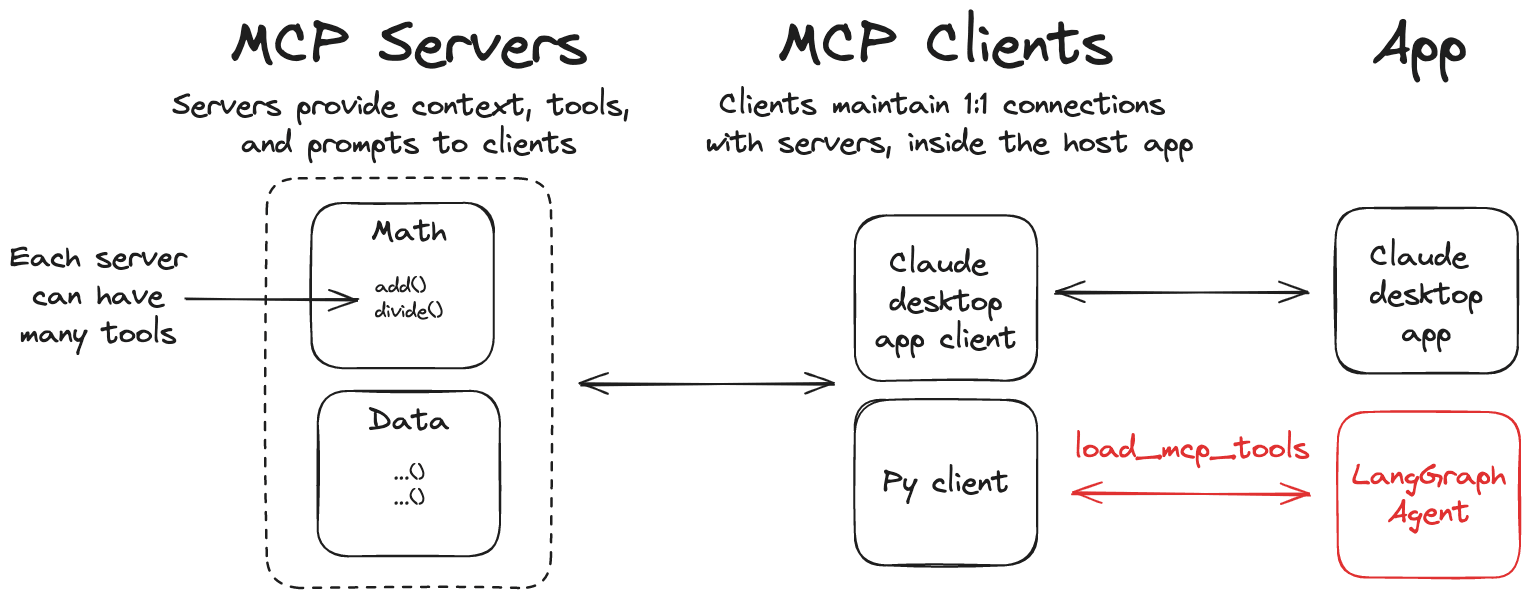
LangChain MCP 適配器這個庫提供了一個輕量級的適配器,使得 Anthropic Model Context Protocol (MCP) 工具與 LangChain 和 LangGraph 相容。 特性 🛠️ 將 MCP 工具轉換為 LangChain 工具,可以與 LangGraph 代理一起使用 📦 一個客戶端實現,允許你連接到多個 MCP 伺服器並從它們加載工具 安裝 pip install langchain-mcp-adapters 如果使用的是 uv 包管理器,可以使用以下命令安裝: uv add langchain-mcp-adapters langgraph langchain-openai 快速開始 下面我們來使用這個庫來創建一個簡單的示例。 首先,我們需要設置你的 OpenAI API 密鑰: export OPENAI_API_KEY=<your_api_key> # 如果需要使用代理,可以設置這個變量 export OPENAI_API_BASE=<your_api_base> 服務端 比如讓我們創建一個可以添加和乘以數字的 MCP 伺服器,代碼如下所示: # math_server.py from fastmcp import FastMCP mcp = FastMCP("Math Server") @mcp.tool() def add(a: int, b: int) -> int: """Add two integers""" return a + b @mcp.tool() def mul(a: int, b: int) -> int: """Multiply two integers""" return a * b if __name__ == "__main__": mcp.run(transport="stdio") 客戶端 接下來,讓我們創建一個客戶端,使用 MCP 工具與 LangGraph 智能體一起工作。 # client_demo.py from mcp import ClientSession, StdioServerParameters from mcp.client.stdio import stdio_client import asyncio from langchain_mcp_adapters.tools import load_mcp_tools from langgraph.prebuilt import create_react_agent from langchain_openai import ChatOpenAI model = ChatOpenAI(model="gpt-4o") server_params = StdioServerParameters( command="python", # 確保更新到 math_server.py 的完整絕對路徑 args=["/your/path/to/math_server.py"], ) async def main(): async with stdio_client(server_params) as (read, write): async with ClientSession(read, write) as session: # 初始化連接 await session.initialize() # 獲取工具 tools = await load_mcp_tools(session) print(f"tools: {tools}") # 創建並運行代理 agent = create_react_agent(model, tools) agent_response = await agent.ainvoke({"messages": "what's (3 + 5) x 12?"}) # 輸出所有消息 print("All messages:") for message in agent_response["messages"]: print(f"Message type: {type(message).__name__}") print(f"Message content: {message.content}") if hasattr(message, 'tool_calls') and message.tool_calls: print(f"Tool calls: {message.tool_calls}") if hasattr(message, 'name') and message.name: print(f"Tool name: {message.name}") if hasattr(message, 'tool_call_id') and message.tool_call_id: print(f"Tool call id: {message.tool_call_id}") print("-" * 50) if __name__ == "__main__": asyncio.run(main()) 在上面代碼中,我們通過 langchain_mcp_adapters.tools 模組中的 load_mcp_tools 函數來加載 MCP 工具,這個會自動將 MCP 工具轉換為 LangChain 工具。所以後面我們直接用 create_react_agent 就可以直接來創建一個智能體,並傳入這些工具即可使用了。 我們就可以直接運行這個 MCP 客戶端,你會看到類似如下的輸出: $ python3 client_demo.py [04/14/25 10:18:04] INFO Processing request of type ListToolsRequest server.py:534 tools: [StructuredTool(name='add', description='Add two integers', args_schema={'properties': {'a': {'title': 'A', 'type': 'integer'}, 'b': {'title': 'B', 'type': 'integer'}}, 'required': ['a', 'b'], 'title': 'addArguments', 'type': 'object'}, response_format='content_and_artifact', coroutine=<function convert_mcp_tool_to_langchain_tool.<locals>.call_tool at 0x11244aac0>), StructuredTool(name='mul', description='Multiply two integers', args_schema={'properties': {'a': {'title': 'A', 'type': 'integer'}, 'b': {'title': 'B', 'type': 'integer'}}, 'required': ['a', 'b'], 'title': 'mulArguments', 'type': 'object'}, response_format='content_and_artifact', coroutine=<function convert_mcp_tool_to_langchain_tool.<locals>.call_tool at 0x11244aca0>)] [04/14/25 10:18:09] INFO Processing request of type CallToolRequest server.py:534 INFO Processing request of type CallToolRequest server.py:534 All messages: Message type: HumanMessage Message content: what's (3 + 5) x 12? -------------------------------------------------- Message type: AIMessage Message content: Tool calls: [{'name': 'add', 'args': {'a': 3, 'b': 5}, 'id': 'call_0_c350e878-14fc-4b76-9f54-8e2ad7ec0148', 'type': 'tool_call'}, {'name': 'mul', 'args': {'a': 8, 'b': 12}, 'id': 'call_1_c0d807fb-31c8-43ed-9f7c-d4775e30a256', 'type': 'tool_call'}] -------------------------------------------------- Message type: ToolMessage Message content: 8 Tool name: add Tool call id: call_0_c350e878-14fc-4b76-9f54-8e2ad7ec0148 -------------------------------------------------- Message type: ToolMessage Message content: 96 Tool name: mul Tool call id: call_1_c0d807fb-31c8-43ed-9f7c-d4775e30a256 -------------------------------------------------- Message type: AIMessage Message content: The result of \((3 + 5) \times 12\) is \(96\). -------------------------------------------------- 從最後輸出也可以看到,我們的智能體成功地調用了 MCP 工具,並得到了正確的結果。 多個 MCP 伺服器 同樣這個 MCP 適配器還允許你連接到多個 MCP 伺服器並從它們加載工具。 服務端 在上面我們已經創建了一個 MCP 伺服器,接下來我們再創建一個 weather_server.py 的 MCP 伺服器,代碼如下所示: # weather_server.py from mcp.server.fastmcp import FastMCP mcp = FastMCP("Weather") @mcp.tool() async def get_weather(location: str) -> str: """Get weather for location.""" # mock 一个天气数据 return f"It's always sunny in {location}" if __name__ == "__main__": mcp.run(transport="sse") 這裡我們使用 sse 傳輸協議,接下來我們運行這個 MCP 伺服器: $python weather_server.py INFO: Started server process [64550] INFO: Waiting for application startup. INFO: Application startup complete. INFO: Uvicorn running on http://0.0.0.0:8000 (Press CTRL+C to quit) 客戶端 接下來我們再創建一個 client_demo_multi_server.py 的客戶端,代碼如下所示: # client_demo_multi_server.py from langchain_mcp_adapters.client import MultiServerMCPClient from langgraph.prebuilt import create_react_agent from langchain_openai import ChatOpenAI import asyncio model = ChatOpenAI(model="deepseek-chat") async def main(): async with MultiServerMCPClient( { "math": { "command": "python", # 確保更新到 math_server.py 的完整絕對路徑 "args": ["/your/path/to/math_server.py"], "transport": "stdio", }, "weather": { # 確保你從 weather_server.py 開始 "url": "http://localhost:8000/sse", "transport": "sse", } } ) as client: agent = create_react_agent(model, client.get_tools()) math_response = await agent.ainvoke({"messages": "what's (3 + 5) x 12?"}) weather_response = await agent.ainvoke({"messages": "what is the weather in chengdu?"}) for message in math_response["messages"]: print(f"Math Message type: {type(message).__name__}") print(f"Math Message content: {message.content}") if hasattr(message, 'tool_calls') and message.tool_calls: print(f"Math Tool calls: {message.tool_calls}") if hasattr(message, 'name') and message.name: print(f"Math Tool name: {message.name}") if hasattr(message, 'tool_call_id') and message.tool_call_id: print(f"Math Tool call id: {message.tool_call_id}") print("-" * 50) print("*" * 50) for message in weather_response["messages"]: print(f"Weather Message type: {type(message).__name__}") print(f"Weather Message content: {message.content}") if hasattr(message, 'tool_calls') and message.tool_calls: print(f"Weather Tool calls: {message.tool_calls}") if hasattr(message, 'name') and message.name: print(f"Weather Tool name: {message.name}") if hasattr(message, 'tool_call_id') and message.tool_call_id: print(f"Weather Tool call id: {message.tool_call_id}") print("-" * 50) if __name__ == "__main__": asyncio.run(main()) 在上面代碼中通過 MCP 適配器的 MultiServerMCPClient 類傳入了兩個不同的 MCP 伺服器,它允許你連接到多個 MCP 伺服器並從它們加載工具,接下來我們運行這個客戶端,你會看到類似如下的輸出: $python3 client_demo_multi_server.py [04/14/25 10:32:45] INFO Processing request of type ListToolsRequest server.py:534 [04/14/25 10:32:52] INFO Processing request of type CallToolRequest server.py:534 INFO Processing request of type CallToolRequest server.py:534 Math Message type: HumanMessage Math Message content: what's (3 + 5) x 12? -------------------------------------------------- Math Message type: AIMessage Math Message content: Math Tool calls: [{'name': 'add', 'args': {'a': 3, 'b': 5}, 'id': 'call_0_e6994441-0520-4840-a711-552f78f82e57', 'type': 'tool_call'}, {'name': 'mul', 'args': {'a': 12, 'b': 8}, 'id': 'call_1_d7e9a0d9-ba99-4f07-b583-6f554ee6fecc', 'type': 'tool_call'}] -------------------------------------------------- Math Message type: ToolMessage Math Message content: 8 Math Tool name: add Math Tool call id: call_0_e6994441-0520-4840-a711-552f78f82e57 -------------------------------------------------- Math Message type: ToolMessage Math Message content: 96 Math Tool name: mul Math Tool call id: call_1_d7e9a0d9-ba99-4f07-b583-6f554ee6fecc -------------------------------------------------- Math Message type: AIMessage Math Message content: The result of \((3 + 5) \times 12\) is \(96\). -------------------------------------------------- ************************************************** Weather Message type: HumanMessage Weather Message content: what is the weather in chengdu? -------------------------------------------------- Weather Message type: AIMessage Weather Message content: Weather Tool calls: [{'name': 'get_weather', 'args': {'location': 'chengdu'}, 'id': 'call_0_dbabcd6c-39a6-4d39-8509-8763e7792f77', 'type': 'tool_call'}] -------------------------------------------------- Weather Message type: ToolMessage Weather Message content: It's always sunny in chengdu Weather Tool name: get_weather Weather Tool call id: call_0_dbabcd6c-39a6-4d39-8509-8763e7792f77 -------------------------------------------------- Weather Message type: AIMessage Weather Message content: The weather in Chengdu is 從上面輸出可以看到,我們的智能體成功地調用了兩個不同的 MCP 伺服器,並得到了正確的結果。 在 LangGraph API 伺服器中使用 [!TIP] 查看 這個指南 開始使用 LangGraph API 伺服器。 同樣如果你想在 LangGraph API 伺服器中運行一個使用 MCP 工具的 LangGraph 智能體,可以使用以下設置: # graph.py from contextlib import asynccontextmanager from langchain_mcp_adapters.client import MultiServerMCPClient from langgraph.prebuilt import create_react_agent from langchain_anthropic import ChatAnthropic model = ChatAnthropic(model="claude-3-5-sonnet-latest") @asynccontextmanager async def make_graph(): async with MultiServerMCPClient( { "math": { "command": "python", # 確保更新到 math_server.py 的完整絕對路徑 "args": ["/path/to/math_server.py"], "transport": "stdio", }, "weather": { # 確保你從 weather_server.py 開始 "url": "http://localhost:8000/sse", "transport": "sse", } } ) as client: agent = create_react_agent(model, client.get_tools()) yield agent 記住要在你的 langgraph.json 中,確保指定 make_graph 作為你的圖表入口點: { "dependencies": ["."], "graphs": { "agent": "./graph.py:make_graph" } } 總結 LangChain MCP 適配器是一個用於 MCP 工具與 LangChain 和 LangGraph 相容的輕量級適配器。它允許你連接到多個 MCP 伺服器並從它們加載工具,並使用這些工具與 LangGraph 智能體一起工作,從而實現更複雜的任務。這也大大降低了在 LangChain 和 LangGraph 中使用 MCP 工具的門檻,讓你可以更方便地使用 MCP 工具。 參考資料 LangChain MCP 適配器 LangGraph API 伺服器